Sageware Studio 1.4: the business in the code
6 November 2026
All six Sageware Studio apps are now at 1.4. The largest change is to Atlas, which has a different job. The rest makes daily work easier in every app: a vault that can live on another machine, a way to show the agent exactly what you mean, and, in Testgen, tests that say more about why they failed.
Atlas: what the code does for the business
Atlas used to map how a codebase fits together: its modules, hotspots and owners. That answered how the code is built, but the question I kept needing answered was a different one: what does it do for the business? How is a late charge worked out, in what units, rounded how? Who may borrow, and how much? What states does a loan go through, and what moves it from one to the next?
Atlas 1.4 opens a repository and has Claude Code or Codex write that down, area by area:
- Rules, in plain words with the real numbers. Each has a formula, the unit of every input and output, its constants, a worked example and the lines of code that do it.
- Workflows, drawn as flowcharts, with who does each step.
- State machines, with what each state means and what moves it on.
- A glossary of the business’s terms and units, which flags a quantity given in different units by different rules.
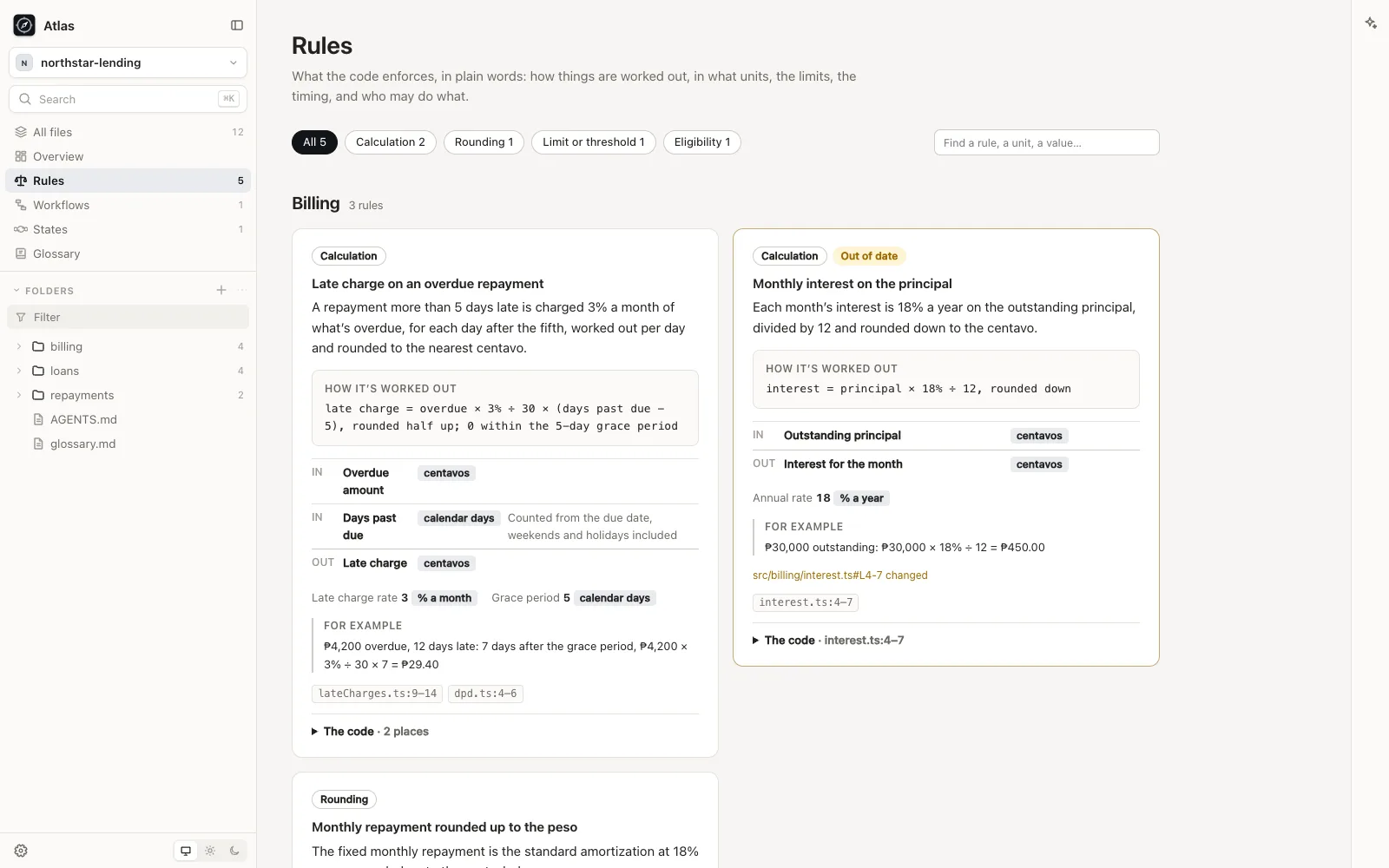
Atlas records what each cited stretch of code says when an item is written. When the code moves, the item’s references follow it. When the code changes, the item is marked Out of date and says which reference changed, and Bring up to date asks the agent to redo just those items.
Everything goes in a .atlas/ folder inside the repository. Each area is a folder, and each rule, workflow and state machine is a Markdown file of its own, which GitHub renders, diagrams included. Commit it with the code if you want your team to have it. Atlas never changes the code and never commits. The map, Hotspots, Owners and Ask pages are gone. More on the Atlas page.
A vault on another machine
A vault can now be kept on another machine, such as a server you ssh into, and worked on from your Mac. The app clones it the first time, and from then on keeps the two copies the same with git over ssh. The app, its agents and History all run on your Mac. The other machine needs only git.
Every version the app saves is sent there. Every half minute, edits made there are brought back. If the same lines change in both places, the version on your Mac is kept and the other machine’s is saved beside it, so neither is lost. A new status bar along the foot of the window says whether you’re in sync, what’s still to send and when it last synced; click it to sync now. If the machine can’t be reached, your changes are kept on your Mac until it’s back.
It’s set up in the app’s remote.json, with the machine and the folder the vault is in.
Point at what you mean
In Docgen and Protogen, Point at (⌘⇧S, or the pointer beside the paperclip) lets you click part of a document or prototype and send it with your message. ⇧-click picks more than one element, and ↑ picks what’s around the one you clicked. The agent gets which page, tab, slide or screen each element is on, with its text and its HTML. “Make this table narrower” no longer needs a description of which table.
Docgen: outline and highlights
The sidebar now lists the open tab’s headings. Click one to go to it; the one you’re reading is marked as you scroll. Below the tabs, every highlight in the document is listed in reading order. Click one to go to it, or × to remove it. A highlight whose text has changed since it was made is struck through, so reviewing a document ends with a list of what’s left.
Testgen: datasets, issues, and why a test failed
- Datasets. The records a test only reads, such as the customer with an overdue loan, live in a folder’s
datasets/. A@dataset:stagingtag, or the folder’s environment, picks which one, so the same features run against staging’s records or production’s. Records a test creates are named for its run and removed when it ends, pass or fail. - Issues. Report issue in Explore reports a bug in the app under test. Click what’s wrong on the page, say what should happen and how bad it is, and Testgen saves it with a picture of the page, the element, the last steps taken and the errors and failed requests the page had. Reproduce as a scenario has the agent write a failing
@bugscenario for it. - Timed out. A failure that ran out of time is marked Timed out, apart from one that found something wrong.
- Changed flows. Testgen notes each page a scenario passes through. When a failure took a different path from the last time it passed, it shows where the two parted and both paths, and says which failures share the change. Often the test isn’t wrong: the app’s flow changed.
Also new
- Datagen shows a connection’s views on a tab of their own, apart from its tables. Each view shows how it’s stored, what it reads, which views read it, its definition, and its rows when you ask for them.
- Tooltips across the apps show a button’s name in the apps’ own style, quickly.
- Agents can read a linked codebase’s git history (log, diff, blame) without asking each time.
Get it
Each app is on its page: Protogen, Docgen, Datagen, Testgen, Atlas and Infragen, for Macs with Apple Silicon.